Building Browser Agents That Finish Long-Horizon Work
We have been obsessed with building browser agents that can finish long-horizon work. Running them in insurance operations forced us to rebuild our stack five times.
For most of that journey, we could get two of three things: a workflow that was easy to build, reliable in production, or able to keep working for hours.
Insurance made that tradeoff difficult to avoid. APIs can handle parts of the process, but the complete job still moves through browser-based systems and documents. It may take hundreds of actions and pause until someone answers a question the next morning.
RPA-based automation requires engineers to encode the expected route through those systems. When a new case follows a different route, the automation stops. An engineer can add another branch, but enough branches make the workflow too expensive to build and maintain.
LLMs choose the route at runtime. This removes much of the upfront engineering, but introduces uncertainty into every run. A system that works for ten actions can still choose the wrong record or lose the procedure on the hundredth.
We compare all five architectures using the same three measures: the engineering required to build and maintain them, how reliably they reach a verified outcome, and how long they can keep working. Together, these determine whether an agent can automate a real process rather than complete a short task.
Our current harness can carry work for more than two hours, pause overnight, resume through multiple agents, and cross nearly 900 tool calls. The rest of this post explains what we built to get there.
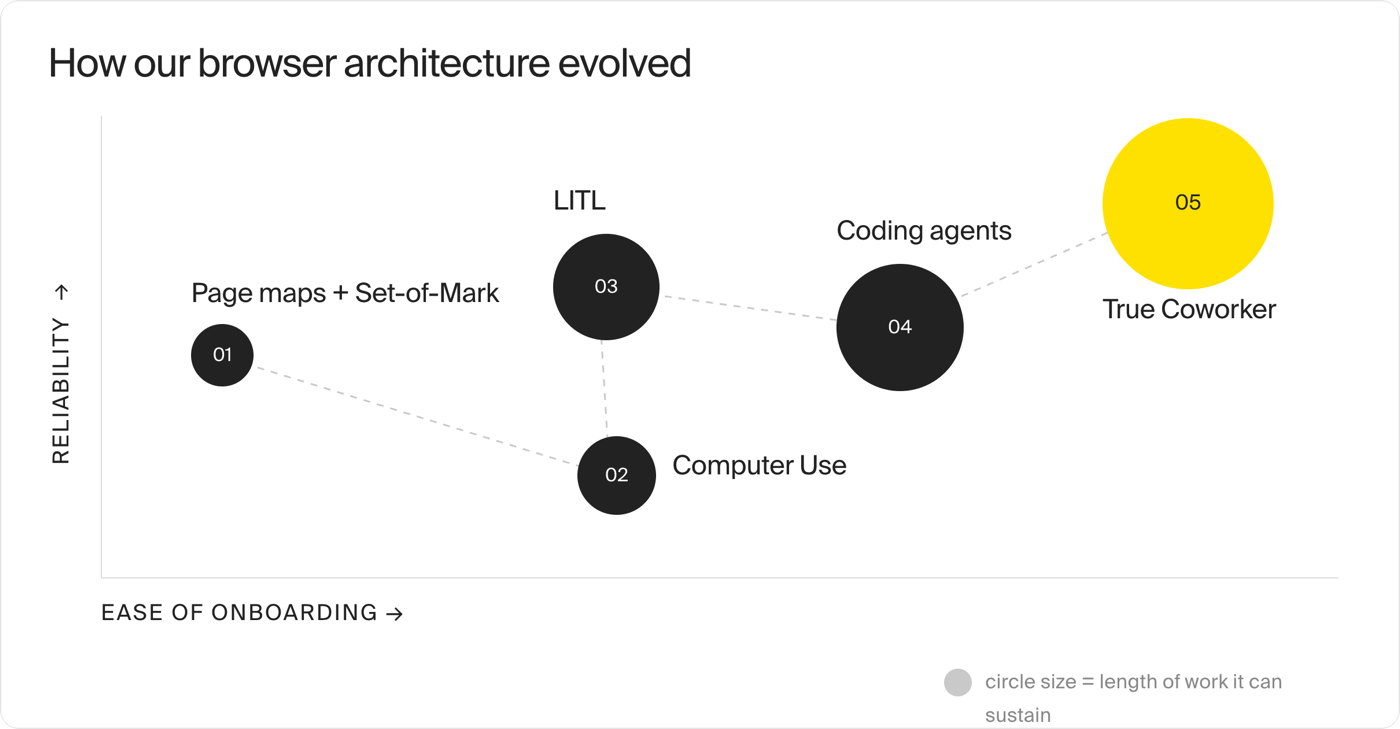
01 - Page maps + Set-of-Mark
High build + maintenance | Reliable on mapped paths | Bounded workflows
Anything that drives a browser has to answer the same question repeatedly: which element should I act on next? Our first browser agent ran a simple loop to do that: Observe, Detect, Act.
Observe collected the screenshot and information about the page. Detect used the model to decide which field, button, or checkbox mattered next. Act performed the click or entered the value. Then the loop began again.
The gap was between Detect and Act. The model could look at a screenshot and say, enter “President” in Job title and click Continue. GPT-4o could understand the screen, but it could not reliably say exactly where to click. Sending the entire DOM was not practical either. GPT-4o had a 128K context window, but enterprise DOM trees filled useful context with hidden elements, duplicate controls, and framework metadata - and had to be sent again after every action.
Set-of-Mark gave us a practical workaround. It is a visual-grounding technique that overlays numbered labels on regions of an image, allowing the model to return a label instead of a pixel coordinate. Our som.js walked the DOM, placed a red number beside each field, button, and checkbox, took a screenshot, and removed the markers. observe.py sent the marked image to GPT-4o.
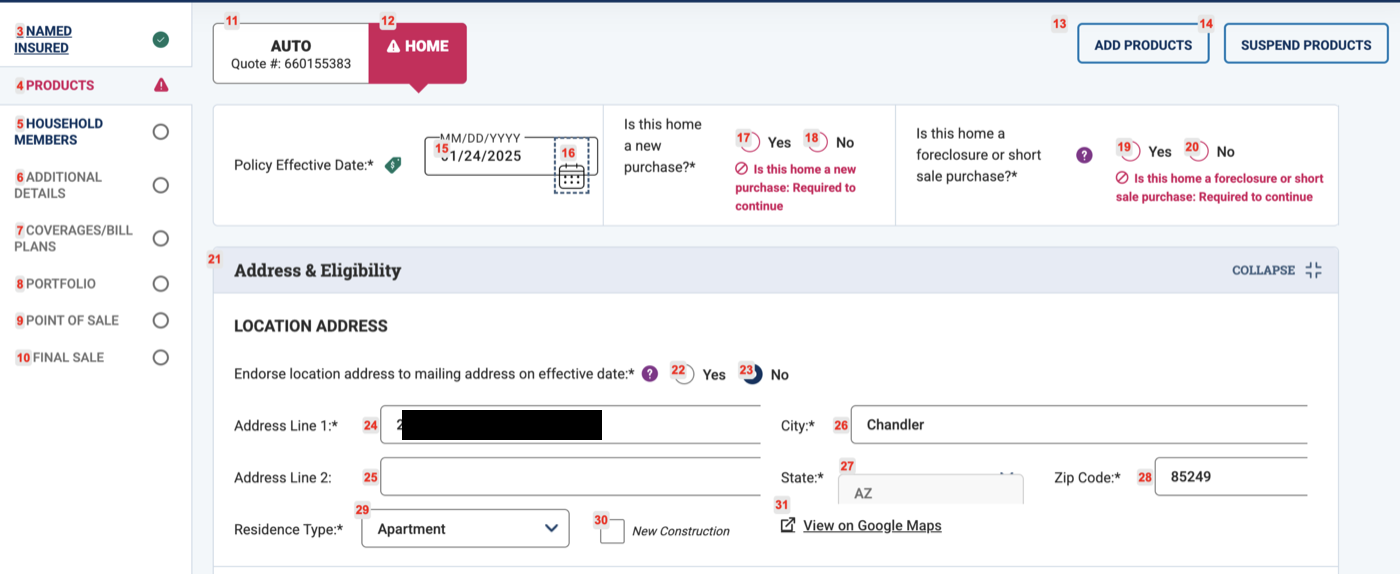
Set-of-Mark made the model useful on a single page. However, one workflow could require 50 actions across 20 pages. The path also changed based on the information entered. Select one answer and a popup appeared. Select another and five new fields loaded. The same button could mean something different depending on where the workflow had reached.
The automation now had to answer a second question: where am I in the procedure?
We added a page classifier to identify the current screen. Each known screen received a natural language description explaining what it contained, which part of the procedure it belonged to, and what actions were valid there.
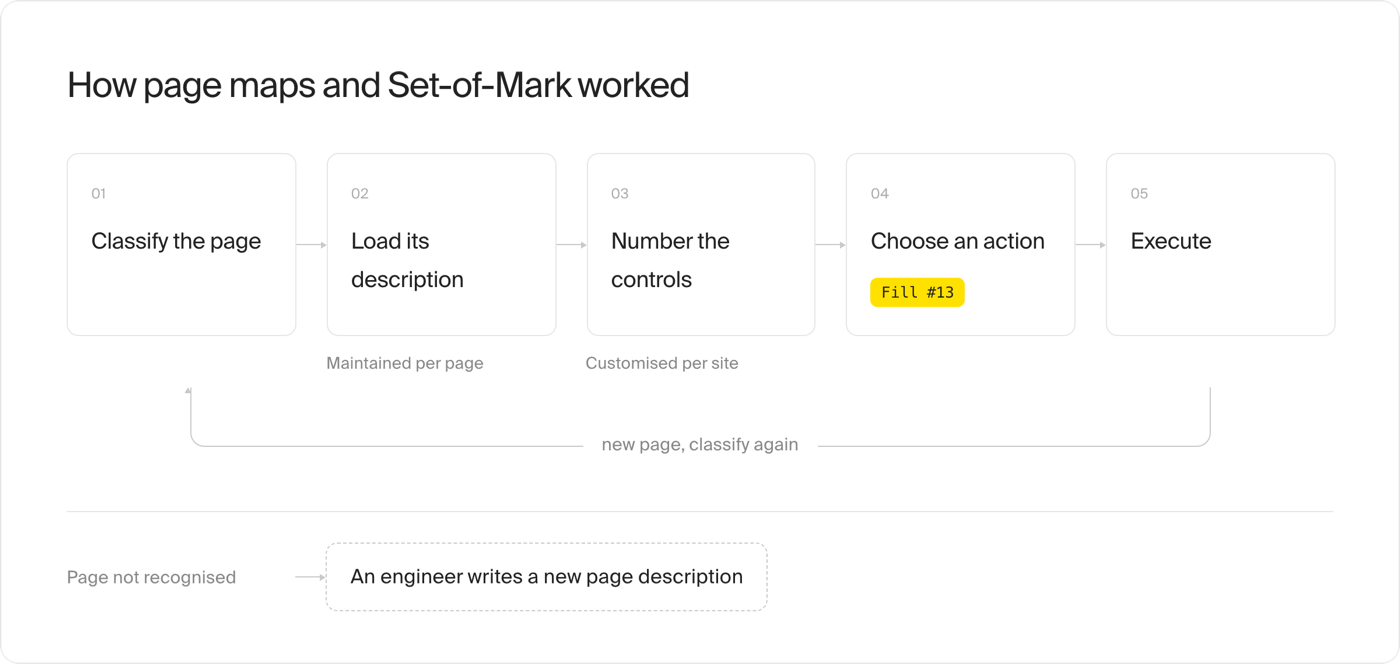
This works on mapped paths, but we do not see it scaling. Every production run finds states that are not captured by either layer. Set-of-Mark misses fields that are hidden, virtualized, or rendered differently. The classifier fails when a popup or unfamiliar screen appears. Fixing one means changing the website-specific marking code; fixing the other means adding another page description.
We rebuilt an RPA shop at a higher level of abstraction.
02 - Computer Use (CUA)
Low build + maintenance | Unreliable on dense pages | Short workflows
By early 2025, Anthropic and OpenAI had released models that could operate a GUI from screenshots. We began testing OpenAI’s Computer-Using Agent in a 1024×768 browser that March.
The loop was simple: take a screenshot → ask the model for the next mouse or keyboard action (for example, click(x=614, y=327)) → perform the action → send back the new screenshot → repeat.
No selectors. No numbered elements. No description of every page. On its first unfamiliar screen, CUA found the right field and clicked it before anyone had mapped the interface.
We were so back.
The optimism survived until we encountered a dense page with 13 checkboxes. CUA selected the first 12 and stopped. Nothing crashed, and no action returned an error. The model simply decided that the work was complete.
We found two recurring problems. First, coordinate prediction became inconsistent as pages grew denser. CUA could understand which checkbox it wanted and still click a few pixels away. Small targets, repeated labels, nested scroll areas, and virtualized tables left little room for error.
Second, the early models struggled to follow and verify a longer procedure. A fresh screenshot showed the current page, but the model still had to remember which steps were complete and what needed to be checked before finishing.
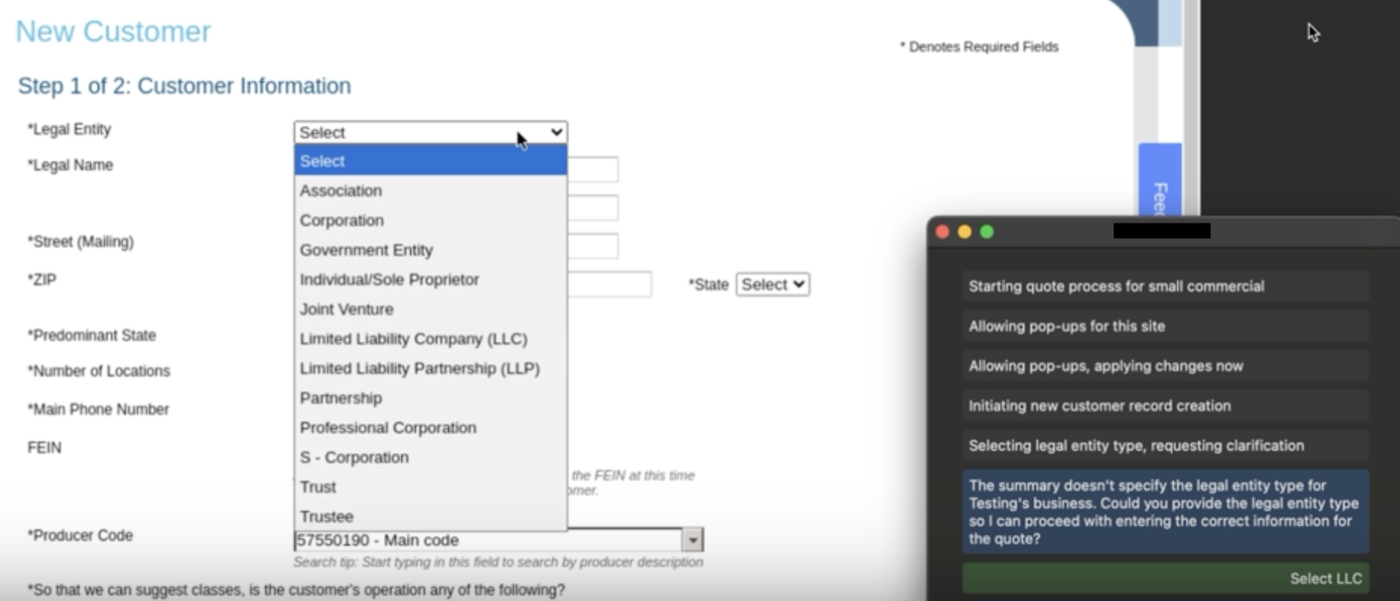
To solve these, we started creating an early version of our harness, including deterministic helpers for difficult controls, explicit checks after important actions, and limits on how long the model could keep trying. Each fix improved reliability but also added workflow-specific engineering effort.
The CUA approach is genuinely good at short, self-contained tasks. But our workflows are neither. Given the choice between a heavily engineered path we can inspect and repair, and a flexible model loop we have to pray will finish, we choose the engineered path.
03 - LLM in the Loop (LITL)
High build + maintenance | ~30% → ~80% completion | Longer, predefined workflows
CUA taught us to invest in the engineering around the model. We returned to deterministic browser automation, but built an action harness to make new workflows faster to build.
The harness provided reusable actions such as Click, Fill, Select, Radio, Checkbox, and SmartSelect. The shared helpers handled frames, scrolling, retries, and timeouts. SmartSelect could use an LLM to match a source value to an unfamiliar dropdown option. This gave us a higher-level vocabulary than raw Playwright calls, which made a workflow easier to build.
We divided each workflow into blocks of such actions. A vehicle block, for example, filled the vehicle page and clicked Continue. The driver block should begin only after the carrier opened the Drivers page. Between them, a checkpoint inspected the live site: was the vehicle saved, was the Drivers page visible, and had any validation message appeared?
The block described what the automation should do. The checkpoint described the state the site had to reach before the workflow could move forward.
When a checkpoint failed, LITL tried to repair the current page. If it could not get the checkpoint to pass, the run moved to a person - a Human in the Loop, or HITL.
Rather than ask one model to “fix the page,” LITL split the repair into three stages.
Diagnosis received a screenshot and the current HTML, capped at 200,000 characters. It identified what on the page might be preventing the checkpoint from passing.
Planner received that diagnosis, the browser snapshot, the available insurance data, and previous repair attempts. It returned a short sequence of actions using the same action harness: Fill, Select, Radio, Checkbox, or Click. Its instructions included business rules such as reusing known values and never inventing a VIN.
Code generation received one planned action and the latest HTML. It found the target on the page and bound the action to a selector, preferring stable IDs, names, ARIA attributes, and data attributes over indexes or dynamic classes.
For example, Fill "Vehicle 2 → Original Cost New" with "30000" could become:
await Fill(
    name="Vehicle 2 - Original Cost New",
    page=self.page,
    selector="#vehicle-2-original-cost",
    value="30000",
).post_delay(1.0).on_success(self.report_action)
The action was still Fill. Code generation supplied the browser-specific selector. The existing helper executed it. After executing the repair, LITL reran the failed checkpoint. If it passed, the deterministic workflow resumed. If it failed, LITL received the new page state and tried again.
The generated Python ran inside the live browser process, which placed the code-generation model inside the trust boundary. We did not have a sandbox, so we capped each repair loop at five attempts before moving the run to HITL review.
Early production results showed that the repair loop worked:
| Outcome | Runs |
|---|---|
| Completed on the engineered path | 11 |
| Recovered by LITL | 14 |
| Required HITL | 3 |
In that week, 25 of 28 runs finished without a person taking over. LITL recovered more runs than the deterministic path completed on its own. Across the workflows where we measured it, completion increased from roughly 30% to roughly 80%.
But LITL can repair a workflow only after engineers define it. It receives one failed block and one checkpoint to satisfy. It can handle an unexpected validation question or a rejected field value. It cannot build the blocks, decide where checkpoints belong, or discover the complete path through a new workflow.
Even with the action harness, building the happy path, known failure paths, and checkpoints took more than two weeks. Changes to the carrier site still require maintenance. LITL moves us up on reliability. It barely moves us right on engineering effort. The workflows can run longer, but only along paths we have already defined.
04 - Coding agents
Lower build + maintenance | Reliability fell on long runs | Hundreds of actions
LITL could repair a workflow after engineers built it. We wanted the model to discover more of the path itself.
Coding agents change what we can ask a model to do. Claude Code and Codex, along with their agent-loop harnesses, can inspect a page, write a small Playwright program, run it, read the result, and revise the code. The browser is now a development environment.
Our Worker runs inside the Claude Agent SDK. We connect a cloud browser through Playwright tools over CDP. On each turn, the model can inspect the accessibility snapshot, use an exact browser action, or run a snippet of code against the live page. The result returns to the model for its next decision.
Inspect the current page
  → Choose a browser tool or write code
  → Execute it against the live browser
  → Read the result
  → Continue, revise, or recover
This gives the model more than a mouse. It can extract the rows of a virtualized table into structured records and then open the selected row through an exact browser reference. The model also controls the normal path. It does not wait behind an engineered block for something to fail.
We give the agent an Agent Operating Procedure, or AOP. An AOP describes the business rules and a step-by-step procedure for a workflow in natural language. The agent works out how to reach the goal in the live system without engineering having to encode every browser screen.
This reduces the engineering required before the first run. But it also consumes more context. Our first version gave the full AOP to one agent. As the run progressed, the transcript accumulated browser snapshots, tool results, and generated code. Performance started degrading as the task ran for longer time horizons.
We split the work into bounded subagents. The top-level Worker keeps the AOP and the overall progress. It delegates browser work, document work, and browser debugging to separate subagents. Each subagent has its own Agent SDK context and a restricted set of tools.
The browser subagent can use Playwright and read or write artifacts. The document subagent can run document-conversion and extraction scripts. The browser-debug subagent can inspect the page but cannot modify files or operate the workflow.
This lets the run span hundreds of actions without forcing every model call to carry every previous screen.
It also exposes the next failure boundary. The Worker is still one process. A subagent can crash, the browser can hang, or a question can remain unanswered until the next morning. A true coworker has to survive those failures.
05 - True coworker
Lower build + maintenance | Reliable in production | 2+ hours, ~900 tool calls
A true coworker learns quickly, remembers preferences, handles change, and owns the final outcome through every interruption. Our harness around coding agents does the same.
Every request creates a Session. The Session begins when work arrives and remains open until Kay has completed and verified it. It remembers what has happened, what Kay has decided, and what remains unfinished.
Workers run inside the Session. Each Worker gets a fresh model context and moves the work forward. If one Worker crashes, another can continue with the same Session.
Request
    ↓
  Session
    ├── Worker 1 → selects the policies → browser crashes
    ├── Worker 2 → resumes → asks the account manager a question
    ├── waits overnight
    └── Worker 3 → receives the answer → finishes and verifies
Workers use skills to operate the browser. A skill is a reusable capability such as finding a policy or downloading a document from a carrier portal. It begins as written instructions with a clear description of what success looks like. As Kay repeats the work, it learns familiar browser actions and caches them into scripts. In a mature AOP, scripts handle roughly seven out of every ten browser actions.
A Session moves between Active and Queued as the work progresses. It is Active while a Worker is running. If Kay needs an answer or a shared login is unavailable, the Session becomes Queued with the reason attached. Before waiting for an answer, Kay records the question, sends it through Teams or email, and releases the browser and login. When the answer arrives or the resource becomes available, the queue starts a new Worker with the saved progress. This keeps one stalled Session from blocking other work and prevents two Workers from using the same stateful account at once.
Finally, the Session owns verification. A browser command succeeding does not prove that the work succeeded. Suppose Kay clicks Issue certificate and the browser hangs before the confirmation appears. Kay cannot assume that the certificate was not issued. The next Worker opens the account and checks for it. If the certificate exists, it continues. If it clearly does not, it tries again. If the result is unclear, Kay stops for review rather than risk issuing it twice.
What’s next
Kay can now complete work that lasts more than two hours and requires over 900 tool calls. That moves the question from whether long-running browser agents can work to how good they can become. These are the problems we are actively thinking about:
- How do we test and train agents on work that takes hours? Most agent evals test isolated actions or short tasks. We are building an Agent Gym for complete workflows: replayable environments, production failures turned into fixtures, and metrics that require repeated success rather than one lucky run.
- How should knowledge work be represented? Our current answer is an AOP for what the work requires and skills for how actions are performed. The harder question is how Kay learns across accounts and workflows without silently changing production behavior.
- How should a coworker behave? Kay should know when to ask, how long to wait, when to release a shared login, and how to connect an email reply to the right Session. Reviewing its work should feel like managing a strong employee: regular reviews, grouped questions, and clear decisions - not inspecting a stream of model traces.
- How do we make it fast and cheap? Reliable work is still slow. We want sessions to begin within minutes, independent work to run in parallel, and familiar browser actions to execute as scripts.
Reliability is the first puzzle. The next is making Kay faster, cheaper, and better at the job while keeping the work dependable.
If these problems sound interesting - long-running agents, browser infrastructure, evals, durable execution, or coworker UX - we are always hiring.
Authored by Anton Fedoruk, Aman Kumar, Akhil Mehta, Serhii Shchoholiev, and Achyut Joshi.